Your Hearing Aids: Setup, Care & Troubleshooting
Ask the Audiologist: Adjusting to New Hearing Aids
Ask the Audiologist: I Have New Hearing Aids. Now What??
Hearing Aid Fitting: What to Expect and How to Get the Right Fit
What You Should Know About Your First Hearing Aid: 10 Tips
How to Fit Hearing Aid Ear Buds
8 Ways to Get the Most Out Of Your Hearing Aid
How to Turn On Your Hearing Aid (Battery and Rechargeable)

How you turn on a hearing aid depends on how it's powered. If it uses disposable batteries, close the battery door. If it's rechargeable, lift it out of its charger. Many modern hearing aids also have a button you can hold down to switch them on or off.
Most people expect a power switch, and a lot of hearing aids simply don't have one. Here's how each type works and what to check when yours won't turn on.
How to Turn On a Hearing Aid With a Disposable Battery
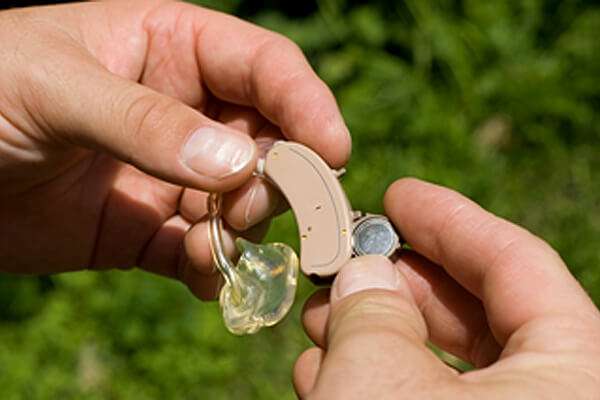
Close the battery door. That's the on switch.

When the door is open, the battery only touches one side of the circuit, so no power flows. Closing the door completes the circuit and the hearing aid comes on, often with a short chime. To turn it off, open the door partway.
If you're putting in a fresh battery, there's one extra step. Hearing aid batteries are zinc-air: they activate when air reaches them. Peel off the colored tab, wait a minute or two, then insert the battery and close the door. Giving the battery that short breather helps it reach full power. Our guide on how to change hearing aid batteries walks through it step by step.
How to Turn On a Rechargeable Hearing Aid
Take it out of the charging case. Most rechargeable hearing aids turn on automatically when you lift them out and turn off when you set them back in to charge.
Many rechargeable models can also be switched on or off by pressing and holding a button for a few seconds, which is useful when there's no charger nearby. The exact button and the charging lights vary by model, so check your manual. Manuals for every Audicus model are in the Audicus support center.
If you're deciding between the two power types, our explainer on how rechargeable hearing aids work covers the trade-offs.
How to Turn Off Your Hearing Aid and Save Battery
Turn your hearing aids off whenever you take them out. For battery models, open the battery door. For rechargeable models, put them back in the charger, which also tops them up overnight.
If you won't be wearing battery-powered aids for a few days or longer, take the battery out completely. That stops any slow drain and lets moisture that's built up inside the hearing aid dry out. Moisture is the main reason batteries corrode in hearing aids, since they spend all day in a warm, humid ear canal. The National Institute on Deafness and Other Communication Disorders recommends keeping hearing aids away from heat and moisture, and storing batteries out of reach of children and pets, who can swallow them.
Why Don't Hearing Aids Have an On/Off Switch?
Mostly because there's no room. The first electric hearing aids were worn on the body, and it wasn't until the transistor arrived that hearing aids could sit on or in the ear. As components shrank, so did hearing aids, until many could fit on a fingertip and nearly disappear in the ear.
A dedicated power switch takes space that designers would rather use for a smaller shell or a bigger battery. So they made the battery door, and later the charger, do the job.
Why Won't My Hearing Aid Turn On?
A dead or drained battery is the most common reason a hearing aid won't turn on, and a blocked wax guard or receiver is the second. Work through these checks in order.
1. Check the Battery or Charge
Start with power. A disposable hearing aid battery typically lasts about 75 to 200 hours of use. Smaller batteries die sooner, and streaming audio over Bluetooth drains them faster, so some people change batteries every few days. Signs of a dying battery include a beeping warning, distorted sound, or sound cutting out entirely. You can learn more in our guide to how long hearing aid batteries last.
For rechargeable aids, make sure the charging case itself has power and that the aids are seated correctly. A misaligned aid won't charge, so match the marker on the hearing aid to the one on the case.
2. Replace the Battery
If you have a battery model, swap in a fresh one before trying anything else. Remember to peel the tab and give it a moment. Carry spares with you so a dead battery doesn't leave you without sound halfway through the day.
3. Check for a Blockage
Earwax and debris can block the wax guard, dome, or receiver, which can make a working hearing aid sound dead or very weak. Clean the hearing aid carefully and replace the wax guard if it looks clogged. Our guide to properly cleaning your hearing aids shows what to look for.
4. Contact Support
If your hearing aid still won't turn on after a fresh battery or full charge and a cleaning, contact Audicus support for help. The Audicus support center also has manuals and how-to videos for each model.
Battery door or charger, the rule is the same: give it power, keep it clean, and most hearing aids that "won't turn on" will.
Your Hearing Aids: Setup, Care & Troubleshooting
Ask the Audiologist: Adjusting to New Hearing Aids
Ask the Audiologist: I Have New Hearing Aids. Now What??
Hearing Aid Fitting: What to Expect and How to Get the Right Fit
What You Should Know About Your First Hearing Aid: 10 Tips
How to Fit Hearing Aid Ear Buds
8 Ways to Get the Most Out Of Your Hearing Aid
How to Turn On Your Hearing Aid (Battery and Rechargeable)